
Download Imperium – Free, Secure, Minimalist File Manager for Windows, Mac & Linux
Imperium is a free, open-source file manager designed for desktop users who value simplicity, speed, and elegance. Created by indie developer Dreamcrafter, Imperium offers a modern alternative to traditional file explorers on Windows, Mac, and Linux. With its dual-pane interface inspired by Total Commander, Imperium delivers a streamlined experience that prioritizes usability and stability.
Unlike bloated system file managers, Imperium keeps things clean and intuitive—perfect for users who want more control without the clutter. Whether you're organizing media, managing code repositories, or transferring files across drives, Imperium makes the process smooth and efficient. Its lightweight design ensures minimal system resource usage, making it ideal for both older machines and high-performance setups.
With features like tabbed browsing, customizable hotkeys, and a smart Jump Bar (Ctrl+J), Imperium is built for productivity. While still in early development, the software shows strong promise and is already a compelling choice for power users and minimalists alike.
Minimalist Design Meets Powerful Functionality
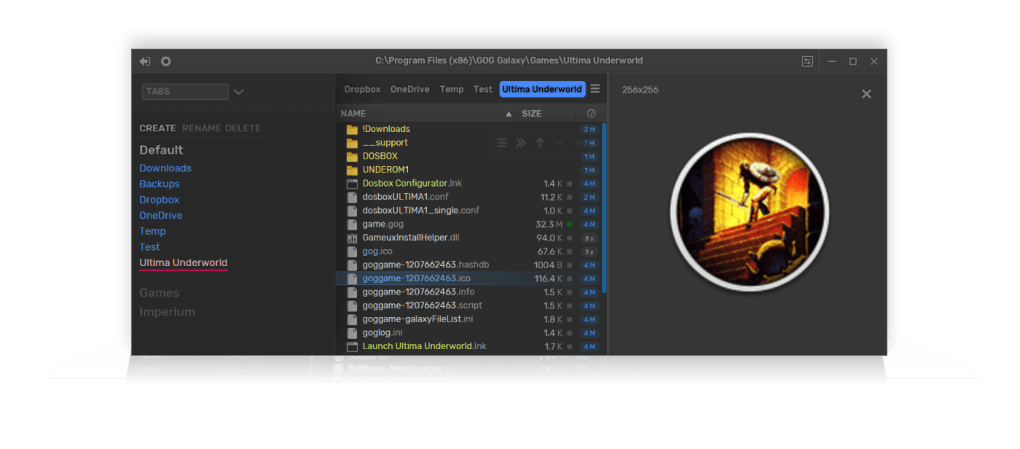
Imperium stands out in the crowded file management space due to its elegant, minimalist interface that doesn’t sacrifice functionality. The dual-pane layout is instantly familiar to users of Total Commander or other advanced file managers, but Imperium refines it with a cleaner aesthetic and thoughtful interactions. The left panel displays your file tree, offering a hierarchical view of drives and folders, while the right pane serves as a dynamic preview window—perfect for viewing images, PDFs, or text files without opening external applications. This real-time preview capability enhances workflow efficiency, especially when sorting through large media libraries or reviewing documents on the fly. One of the most impressive aspects of Imperium’s design is its attention to user experience. The top-left corner houses a toggle button for a contextual sidebar, which can be used for quick access to recent files, bookmarks, or system shortcuts. The Jump Bar, accessible via Ctrl+J, allows for rapid navigation between directories—just start typing a folder name and Imperium auto-completes the path. This feature alone significantly reduces time spent browsing through nested folders. Additionally, tabbed browsing is fully supported and can be enabled via the hamburger menu in the top-right corner. Users can create multiple tabs and even group them logically, which is a game-changer for complex projects involving several file paths. The Command Palette, activated through the gear icon, brings advanced commands to your fingertips—swap panels, toggle Zen mode (a single-pane view for distraction-free work), and more. These features are not just gimmicks; they’re practical tools that enhance productivity. The settings menu is equally intuitive, allowing users to assign custom hotkeys and enable the “travel-as-you-go” function, which automatically navigates to folders as you type. While the interface is clean, it doesn’t limit customization—users can tweak almost every aspect to match their workflow. For those who appreciate a modern, uncluttered workspace, Imperium delivers a satisfying blend of beauty and utility.Installation, Usage & Cross-Platform Compatibility
Getting started with Imperium is straightforward, regardless of your operating system. The software is available for Windows (64-bit), macOS (Intel & Apple Silicon), and Linux (Debian/Ubuntu, Arch, and other distributions). You can download the latest version from the official GitHub repository, ensuring you always get the most up-to-date, secure build. The installation process is simple: just download the appropriate package, extract it (no installer required), and launch the executable. This portable design means you can run Imperium from a USB drive or cloud folder—ideal for users who switch between devices. Once launched, Imperium opens with a clean dual-pane layout. The left pane displays your system drives and folders, while the right pane shows the contents of the selected folder. You can navigate using the mouse, keyboard shortcuts, or the Jump Bar. To open a file, simply double-click it—previewing images or documents happens instantly. For file operations like copying, moving, or renaming, right-click context menus offer quick access. Tabbed browsing allows you to manage multiple directories simultaneously, and the tab groups feature helps organize them by project or purpose. The software is lightweight and runs efficiently even on older hardware. It uses minimal RAM and CPU, making it a great alternative to resource-heavy file managers. Because it’s open-source, the code is publicly available for review, ensuring transparency and security. Regular updates are pushed to GitHub, so users benefit from bug fixes and feature improvements. While it’s still experimental, the developer actively engages with the community, responding to feedback and prioritizing stability. Whether you're a casual user or a tech-savvy power user, Imperium adapts to your needs without overwhelming you.Pros, Cons & Frequently Asked Questions
- Pros:
- Free and open-source with no hidden costs
- Minimalist, modern, and visually appealing interface
- Dual-pane layout with real-time file previews
- Tabbed browsing and tab grouping for better organization
- Customizable hotkeys and travel-as-you-go navigation
- Lightweight with low system resource usage
- Available for Windows, Mac, and Linux
- Portable—no installation needed
- Cons:
- Still in early development—some bugs and performance hiccups
- Not ideal for heavy-duty file operations (e.g., batch processing)
- Limited documentation compared to mature software
- No built-in file compression or extraction tools
- Occasional UI glitches on certain systems
Frequently Asked Questions (FAQ)
Is Imperium free to download and use?
Yes, Imperium is completely free and open-source. You can download, use, and even modify the source code without any restrictions. It’s licensed under the MIT license, ensuring full transparency and user freedom.
On which operating systems does Imperium run?
Imperium is compatible with Windows (64-bit), macOS (Intel and Apple Silicon), and Linux (Debian/Ubuntu, Arch, and other major distributions). The portable nature of the app means it runs without installation.
Can I use Imperium as a replacement for Windows Explorer or Finder?
Absolutely. Imperium offers a more powerful and customizable experience than default file managers. With dual-pane navigation, tabbed browsing, and advanced shortcuts, it’s an excellent alternative for users who want more control.
Does Imperium support file compression or extraction?
No, Imperium does not include built-in support for ZIP, RAR, or other archive formats. You’ll need to use external tools like 7-Zip or PeaZip for compression and extraction tasks.
How often are updates released?
Updates are released regularly based on community feedback and developer progress. Check the GitHub repository for the latest releases and changelogs. The project is actively maintained, though it’s still experimental.







